I've been pondering why my students neglect checking the simple possiblities when their programs stop working. They always seem to jump to the possibilities that are more elaborate and therefore less likely. I was pondering this when I had my own jump to big stuff moment *cue transistional wind chime back-in-time music*
I was driving in my vintage '98 Grand Am (I know jealous), when I heard a clunking sound from the back. So I turned off the radio to listen more closely, at which point I became distracted by my own deep thoughts. About 5 minutes later I realized I didn't have any music which made me distraught. So, I immediately starting playing with my radio assuming that it had died. I tweaked the volume, changed the station, changed to AM and back to FM (I know I still listen to the radio), and was about to bemoan the death of my radio when I recalled turning it off. With a sheepish triumph I pushed the ON button and was graced with soft melodies.
So, it would appear that jumping to the worst possible conclusions is something I am guilty of too. I am sure this is an identified bias that humans suffer from but can't for the life of me remember which one it is. Luckily the first step to absolving a problem is recognizing you have one (even if you can't remember the name of it, which I guess is another problem ...)

Tuesday, June 28, 2011


Teaching Programmers ... or Programming Teachers?
So, I've been struggling lately with deducing the best* way to teach computer programming. So far, I'm at a bit of a loss. From my exhaustively intensive Google searching, I have deduced that there is not much out there regarding teaching computer programming/science. It appears that either everyone already knows how to do it, or everyone assumes they know how to do it. Being as I've assumed that I don't know how to teach it, I'm up the proverbial creek without a paddle.
 So that leaves me with the task of creating a paddle for this creek (and that is where the analogy ends before you throw me overboard **). I will begin by recounting my current approach to teaching CS and proceed from there:
1. I lead in class 'tutorial' sessions peppered with lectures. I try to keep the lecturing (i.e. directly disseminating information without the students programming) short to focus in on solving a coding problem together.
2. In terms of assessment, my courses have exams (1 if the course is under 3 weeks, 2 if longer) and projects (open ended, PBL style). I have recently started adding in assignments, which are coding problems that are laid out for the students.
3. My class runs for a 5 hour block, Monday to Friday (which is a lot of time to teach).
4. I've started adding in what I call 'Quick Checks' which are questions related to the theory of what we are covering, but unrelated to the problem we are solving (they are meant to help the students pull out the concepts being used to solve the problem).
Now that that is out of the way, here are my observations thus far:
1. It recently dawned on me that my approach of 'live-coding' is really no better than having the students copy copious amounts of notes from the board. I believed that since they were coding (and therefore doing) it was a good approach. However, I have been finding that the students are just copying the code down without applying much thought to the process. So, problem 1 is to find a way to rectify that while still covering problems that are interesting and applicable to what they will face in the job market.
2. The Quick Checks have shown me that the students have difficulty separating the logic of the solution from the scenario of the solution. I think that they see them as the same thing. This is of course highly detrimental to coding, as coding is problem solving which is the act of applying similar thinking to new problems. So problem 2 is finding a way to separate the ingredients from the recipe.
3. The open-ended projects (which are meant as a means to explore the topics covered in course and create items for their portfolio) tend to be highly derivative of the examples I do in class. I feel this reinforces my conclusion drawn in 2 that the students have difficulty separating the logic from the solution.
4. There is still a problem with the terminology we use (i.e. methods, functions, constructors, parameters versus arguments) as well as problems with writing proper syntax. Along the same thread, some students are still having trouble formatting their code neatly (which I am a huge advocate for). This makes it much harder to learn the more challenging problem solving skills as the they are still grappling with the language in which the solution is framed.
5. There is difficulty in remember what we have already completed on the current problem. This is challenging as we often try to reuse code to minimize the amount that needs to be written. However, if you don't recall what has already been done, it is difficult to reuse it or even move forward. I find this also translates into not knowing what the program should be doing when we test it.
In regards to solutions, unfortunately at this point I only have ideas. My biggest worry about implementing changes is my own bias that the changes are effective/ineffective. I need a metric to indicate if the students are actually benefiting. My thinking is something similar to the Physics based Force Concept Inventory, however I cannot find an equivalent one for CS. Since my courses are over so quickly and then we are changing topics/programming language it is difficult to use my exams as a means for assessment (although I have ideas along that thread).
So, at this point dear reader I leave you as puzzled as I am; hopeful that you are intrigued to find this solution (or at least awake). I will leave scribblings on my ideas to future posts.
* best is a fairly loose word to use here, I know ... tsk tsk
** that is the actually end of the analogy, the first was a blatant lie.
 So that leaves me with the task of creating a paddle for this creek (and that is where the analogy ends before you throw me overboard **). I will begin by recounting my current approach to teaching CS and proceed from there:
1. I lead in class 'tutorial' sessions peppered with lectures. I try to keep the lecturing (i.e. directly disseminating information without the students programming) short to focus in on solving a coding problem together.
2. In terms of assessment, my courses have exams (1 if the course is under 3 weeks, 2 if longer) and projects (open ended, PBL style). I have recently started adding in assignments, which are coding problems that are laid out for the students.
3. My class runs for a 5 hour block, Monday to Friday (which is a lot of time to teach).
4. I've started adding in what I call 'Quick Checks' which are questions related to the theory of what we are covering, but unrelated to the problem we are solving (they are meant to help the students pull out the concepts being used to solve the problem).
Now that that is out of the way, here are my observations thus far:
1. It recently dawned on me that my approach of 'live-coding' is really no better than having the students copy copious amounts of notes from the board. I believed that since they were coding (and therefore doing) it was a good approach. However, I have been finding that the students are just copying the code down without applying much thought to the process. So, problem 1 is to find a way to rectify that while still covering problems that are interesting and applicable to what they will face in the job market.
2. The Quick Checks have shown me that the students have difficulty separating the logic of the solution from the scenario of the solution. I think that they see them as the same thing. This is of course highly detrimental to coding, as coding is problem solving which is the act of applying similar thinking to new problems. So problem 2 is finding a way to separate the ingredients from the recipe.
3. The open-ended projects (which are meant as a means to explore the topics covered in course and create items for their portfolio) tend to be highly derivative of the examples I do in class. I feel this reinforces my conclusion drawn in 2 that the students have difficulty separating the logic from the solution.
4. There is still a problem with the terminology we use (i.e. methods, functions, constructors, parameters versus arguments) as well as problems with writing proper syntax. Along the same thread, some students are still having trouble formatting their code neatly (which I am a huge advocate for). This makes it much harder to learn the more challenging problem solving skills as the they are still grappling with the language in which the solution is framed.
5. There is difficulty in remember what we have already completed on the current problem. This is challenging as we often try to reuse code to minimize the amount that needs to be written. However, if you don't recall what has already been done, it is difficult to reuse it or even move forward. I find this also translates into not knowing what the program should be doing when we test it.
In regards to solutions, unfortunately at this point I only have ideas. My biggest worry about implementing changes is my own bias that the changes are effective/ineffective. I need a metric to indicate if the students are actually benefiting. My thinking is something similar to the Physics based Force Concept Inventory, however I cannot find an equivalent one for CS. Since my courses are over so quickly and then we are changing topics/programming language it is difficult to use my exams as a means for assessment (although I have ideas along that thread).
So, at this point dear reader I leave you as puzzled as I am; hopeful that you are intrigued to find this solution (or at least awake). I will leave scribblings on my ideas to future posts.
* best is a fairly loose word to use here, I know ... tsk tsk
** that is the actually end of the analogy, the first was a blatant lie.
Tuesday, March 29, 2011
Installing XAMPP as a Portable Application
This tutorial will take you through installing XAMPP (Apache Server, MySQL, PHP, and Perl; the X is to indicate it is cross-platform) as a portable application on a USB drive. To complete this tutorial you should have a USB2.0 drive with at least 500 mb of free space available (I recommend a minimum of a 2Gb drive dedicated to this purpose).
We will be installing XAMPPLite as it is a bit smaller (approximately a quarter of the size at 277mb) of the current full install of XAMPP and therefore better suited to run off a stick. There is no XAMPPLite at the current version release of XAMPP, so we will download and install the last release (1.7.3).
Download the file from:
Once downloaded (the file is only 28.4mb) run the file.
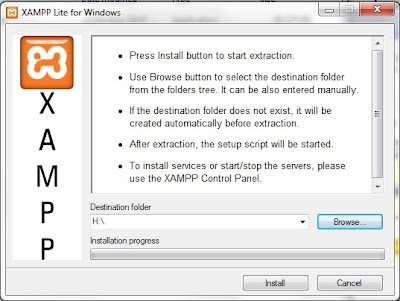
This window will appear. Ensure that your USB drive is plugged into a USB port on your computer. Select the letter assigned to your drive for the Destination folder shown to the left. Click on the Install button and go put your feet up for a bit (it will unpack the files to your drive which should take approximately 20-30 minutes).
Once the unpacking is finished a command prompt window will open and ask a series of questions:
- Should I add shortcuts to the startmenu/desktop? (y/n)
Choose n (no) here as this is a portable install and you probably won't run it off this computer on a regular basis (otherwise do a normal install of XAMPP or a similar program).
- Should I locate the XAMPP paths correctly? Should I proceed? (y/x=exit setup):
Choose y (yes) here as this is not really much of a choice (and is necessary for any install of XAMPP).
- Should I make XAMPP portable without drive letters? Your choice (y/n):
Choose y (yes) here as USB drives can be assigned a different drive letter depending on what is already installed on the host computer. This will allow XAMPP to work regardless of the drive letter on the USB Drive. However, you will have to manually start XAMPP to work with it off the stick (as it will not be a service). This will be covered in the next tutorial.
You should now receive a number of lines indicating that programs are being relocated followed by a message saying that XAMPP is ready to use. Press the enter key to move to the next step.
XAMPP then indicates that it set the time zone for you and where to go to change that later (once again a future tutorial).
At this point you are presented with a menu of options. Choose x to exit the menu. Congratulations you are now the proud owner of a portable web server.
Sunday, February 27, 2011
Resources of the Week - Mar 4/2011
Here are the best design resources I found while surfing this week:
General Reading:
Why Does Clean Markup Matter in Web Design? via webdesigner depot
HTML5 Specification (from WHATWG)
15 Useful Design Tips/Articles to Create a Great Resume via ibrand studio
De-Motivational Posters for Freelancers via FreelanceSwitch
In Search Of The Perfect CAPTCHA via Smashing Magazine
A Review of the iPad 2
Coding:
Essential JavaScript Design Patterns For Beginners
Freelancing/Job Hunting:
Five Popular Design Portfolio Website Styles via Six Revisions
General Reading:
Why Does Clean Markup Matter in Web Design? via webdesigner depot
HTML5 Specification (from WHATWG)
15 Useful Design Tips/Articles to Create a Great Resume via ibrand studio
De-Motivational Posters for Freelancers via FreelanceSwitch
In Search Of The Perfect CAPTCHA via Smashing Magazine
A Review of the iPad 2
Coding:
Essential JavaScript Design Patterns For Beginners
Freelancing/Job Hunting:
Five Popular Design Portfolio Website Styles via Six Revisions
Sunday, February 20, 2011
Resources of the Week - Feb 25/2011
Here are the best design resources I found while surfing this week:
General Reading:
Best 2010 Google Logos Design Inspiration via Logolithic
29 Things that All Young Designers Need to Know via HOW
10 Things You Can Do To Become A Better Web Designer via vanseodesign
960 Grid System
Freelancing/Job Hunting:
Creating an Effective Online Portfolio: 40+ Tips, Tools & Inspirations via 1WD.co
Tutorials
Create a Wooden Social Media Icon Quickly with Photoshop via Design Instruct
Design And Develop A Complete Website (A Tuts+ Mini Series, Pt 1) via WebDesignTuts+
Tools:
The Hello Bar
General Reading:
Best 2010 Google Logos Design Inspiration via Logolithic
29 Things that All Young Designers Need to Know via HOW
10 Things You Can Do To Become A Better Web Designer via vanseodesign
960 Grid System
Freelancing/Job Hunting:
Creating an Effective Online Portfolio: 40+ Tips, Tools & Inspirations via 1WD.co
Tutorials
Create a Wooden Social Media Icon Quickly with Photoshop via Design Instruct
Design And Develop A Complete Website (A Tuts+ Mini Series, Pt 1) via WebDesignTuts+
Tools:
The Hello Bar
Friday, February 11, 2011
Resources of the Week - Feb 18/2011
Here are the best design resources I found while surfing this week:
General Reading:
A Comprehensive Guide to Web Terminology via PelFusion
25 Super Web-based HTML & CSS Tools via AppStorm
Designing with Web Standards via Layers Magazine
100 + Must Have Cheat Sheets and Quick References For Web Designers and Developers via Designbeep
The Beginner's Guide To SEO
Freelancing/Job Hunting:
Cold-Calling via Inc.
Tutorials
Design a Beautifully Detailed Web Button via WebDesignTuts+
25 Cool light effect tutorials in Photoshop via MachoArts
Freebies:
Tree Bark: Texture Pack via Design Instruct
General Reading:
A Comprehensive Guide to Web Terminology via PelFusion
25 Super Web-based HTML & CSS Tools via AppStorm
Designing with Web Standards via Layers Magazine
100 + Must Have Cheat Sheets and Quick References For Web Designers and Developers via Designbeep
The Beginner's Guide To SEO
Freelancing/Job Hunting:
Cold-Calling via Inc.
Tutorials
Design a Beautifully Detailed Web Button via WebDesignTuts+
25 Cool light effect tutorials in Photoshop via MachoArts
Freebies:
Tree Bark: Texture Pack via Design Instruct
Friday, February 4, 2011
Resources of the Week - Feb 11/2011
Here are the best design resources I found while surfing this week:
Events:
FITC Toronto - A Flash and Interactive Content Developer Conference
General Reading:
8 Tips for Freelance Designers to Get Paid Faster via Designmodo
What Everyone Ought to Know about Initial Client Meeting via 1wd.co
6 Essential Things All Freelancers Should Be Doing via Six Revisions
15 Best Resources in Designing a Perfect Business Card via iBrandStudio
Four Constants in the Ever-changing Web Design Industry via Six Revisions
Must Read Links for Web Designers and Developers – Volume 1 via TechKing
Tutorials
Text Effects Session via PSDTuts+ (a series of interesting text effects)
Start Using the Brush Tool – Basix via PSDTuts+
Create an Awesome Typographic Piece of Art in Photoshop via TechKing
Software
NexusFont - great free font manager
Freebies:
5 Free Business Card PSD's via Designmodo
Huge Collection of 55 Vector Silouettes Free to Download via designresourcebox
Premium Icon Freebies From The Design World – 35 Icon Sets via designresourcebox
Free Serif Fonts – Tradition of Typography via cruzine
Events:
FITC Toronto - A Flash and Interactive Content Developer Conference
General Reading:
8 Tips for Freelance Designers to Get Paid Faster via Designmodo
What Everyone Ought to Know about Initial Client Meeting via 1wd.co
6 Essential Things All Freelancers Should Be Doing via Six Revisions
15 Best Resources in Designing a Perfect Business Card via iBrandStudio
Four Constants in the Ever-changing Web Design Industry via Six Revisions
Must Read Links for Web Designers and Developers – Volume 1 via TechKing
Tutorials
Text Effects Session via PSDTuts+ (a series of interesting text effects)
Start Using the Brush Tool – Basix via PSDTuts+
Create an Awesome Typographic Piece of Art in Photoshop via TechKing
Software
NexusFont - great free font manager
Freebies:
5 Free Business Card PSD's via Designmodo
Huge Collection of 55 Vector Silouettes Free to Download via designresourcebox
Premium Icon Freebies From The Design World – 35 Icon Sets via designresourcebox
Free Serif Fonts – Tradition of Typography via cruzine
Subscribe to:
Posts (Atom)